 CCViewer
GitHub
CCViewer
GitHub
How do I view the full history of a Claude Code session?
Claude Code records every session completely on your local disk, so there are three main ways to view the history — ranked by ease of use below.
Method 1: Replay it visually in the browser with CCViewer (recommended)
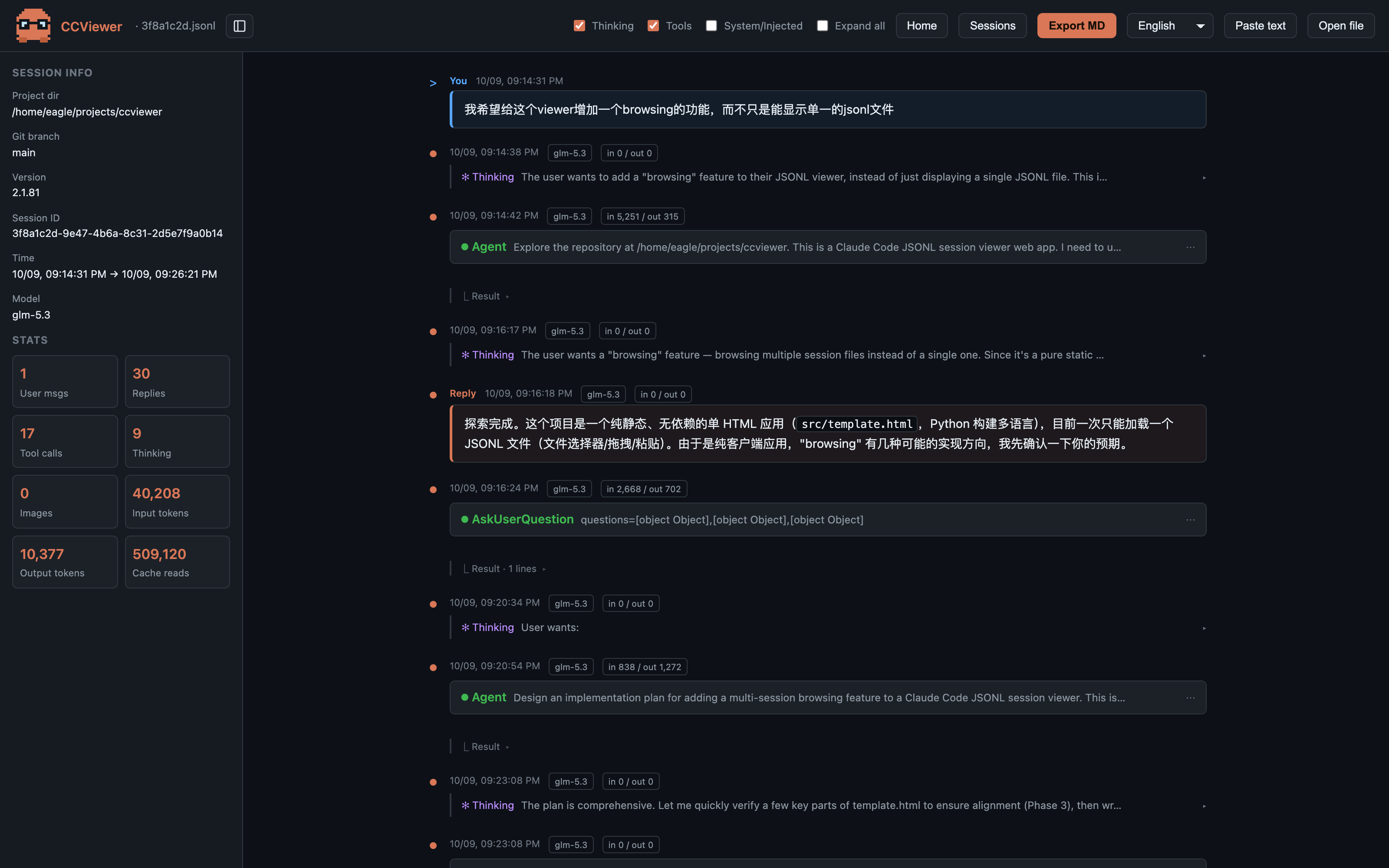
CCViewer is a free, open-source Claude Code session viewer. Open the page, drop in a session file (you can also pick the whole ~/.claude/projects/ folder to import everything), and replay the session like a chat transcript:
- Full Markdown rendering — code blocks, tables, lists and links rendered as-is, no more walls of JSON;
- Thinking blocks — the model’s extended reasoning, collapsible with one click;
- Tool calls — parameters and results of every Read / Edit / Bash call, expandable for inspection;
- Usage & cost stats — input/output/cache tokens, session duration, lines added/removed, total cost at a glance;
- Markdown export — turn any session into a shareable
.mddocument in one click.
Crucially, it parses and renders 100% locally in your browser — nothing is uploaded. That matters: session files contain your source code, file paths and sometimes secrets.
Method 2: Resume the session in the terminal
Claude Code has built-in session resume. Run this in the original project directory:
# List this project's sessions and pick one interactively
claude --resume     # shorthand: claude -r

# Resume the most recent session directly
claude --continue   # shorthand: claude -c

# Resume a specific session by ID
claude --resume <sessionId>
Great for "keep working", but inconvenient for reading or searching history: digging through a long session for one tool call is painful, and there are no cost stats.
Method 3: Read the raw JSONL file
Sessions are stored as JSONL at ~/.claude/projects/<project>/<sessionId>.jsonl — one JSON object per line. You can inspect them with any editor or the command line:
# Extract all user prompts with jq
cat ~/.claude/projects/-Users-you-myproject/<sessionId>.jsonl \
  | jq -r 'select(.type=="user") | .message.content'
The raw file is the most complete source (token usage, git branch, timestamps and other metadata), but readability is poor — which is exactly why graphical viewers exist.
Comparison
| CCViewer | claude --resume | Raw JSONL | |
|---|---|---|---|
| Graphical reading | ✅ | Partial (continue chat) | ❌ |
| Markdown rendering | ✅ | ✅ | ❌ |
| Thinking / tool calls | ✅ collapsible | Collapsed summary | Raw JSON |
| Token / cost stats | ✅ | ❌ | Manual jq |
| Multi-session library | ✅ folder import | Current project only | ❌ |
Open the page and drop in a
.jsonl file — or the whole ~/.claude/projects/ folder. Markdown rendering, thinking blocks, tool calls, token & cost stats, all processed locally in your browser. Nothing is ever uploaded.